Tuesday, May 17, 2011

Final Project--The building begins!

With our general goals in mind, we set to work building a model of our robot out of Lego.

Clara and I decided to divide and conquer, so she focused on trying to figure out the best popping mechanism for stage two while I focused on figuring out how to build a creep elevator for stage one.

After thinking about potential pully or cam mechanisms, Lyn showed us the wonder that is the linear gear, and we decided the best way to elevate our creep would be by using the linear gears and a gear train.

An early sketch with possible elevation ideas

Gear train preliminary sketch.. the caption is very necessary in this case.
As you might (or might not) be able to see from my scribbled notes, we were not sure if the gear train would have enough torque to lift the creep's platform.  The only way to find out was to build it and see, so we set to work.

I built this primary structure, then started working on the gear trains.  It took a while to figure out the correct gear ratio.  We needed a gear train that would allow for slow elevation without having too much torque. (We didn't want our creep to elevate too fast, since that would make him lose some of his creepiness.) Here is the process:

Linear gear track
Close up: Linear gears!
We started with mini gear trains..

Two mini gear trains

Attached them to the motor...
Put it all in a Lego box...
And tried out the structure for size!


The linear gear idea seemed like it would work, so it was time to go big and build a full-sized gear train:

Linear gear posts--one for each corner of our elevator-to-be

One of two gear trains
After attaching a motor between the two gear trains,  and a Lego bottom and top, our initial stage one mechanism was complete! Here are the gear trains in action (with the top of the Lego box removed):


Finally, after much trail and error and with fingers that had been slightly mangled by too much gear handling, it was time to test out the elevator!


In case you can't tell by my squeals of excitement, it worked!  We put a textbook on top to simulate the weight the elevator would need to carry, and it did a great job.

As you can see the four linear gear posts require a great amount of stabilization.  We planned to connect them to the sides of our creep box, which would require the box to have very accurate proportions.

Now that stage one existed, it was time to figure out how to connect it to stage two. 

After experimenting with various ratchet and spool mechanisms, Clara had the idea to use a scissor-like mechanism to lift our creep head.  She whipped up a lego version, and we attached it to the stage one base.  We were both very excited about this idea, because it seemed much simpler and more plausible than our previous stage two mechanism ideas had been.

Experimenting with ratchet idea

Scissor mechanism!

The scissor mechanism is connected to the motor on the right by two more of the same sort of pieces it is made out of--one the same size (lying flat on the top), and one slightly shorter (connected to the motor).  When the motor rotates, it causes a forward motion, which in turn activates the scissors.  The piece lying flat on the top is forced to go only in a forward motion, instead of possible up/down or side to side motion, by the little Lego stabilization box above.

We then tested the mechanism out with the motor, to see if it would work.


As you can see the mechanism worked, but lacked much stability.  We were not able to stabilize it using Lego, but planned to build our delrin structure so that it would be able to stabilize everything.  Additionally, we decided to double the scissor mechanism to give it some more power and stability.  We planned to attach the head to spring on top of a small (and very light) platform on the top of the scissor mechanisms.

Final Project--The idea takes shape!

The next week, we went on a field trip to Tufts where we were to present more detailed versions of our top two ideas to Lyn, Chris, and the class.

At this stage, Clara and I had already nearly decided to pursue our creep idea (who am I kidding, we had practically made our decision the moment we came up with the idea), so we focused most of our attentions on him.

We came up with this more detailed game plan:


Having decided what we wanted our creep to do, the next step was to figure out how to make everything happen.  We divided our creep's main actions into two steps, stage one and stage two.

Stage One: The initial creeping motion, activated by person approaching creep.  

We wanted our creep to peer above the lid of his box using some sort of elevator mechanism, and potentially move back and forth slightly.  We thought we might be able to accomplish this 'looking around' motion by putting a magnet in the creep's chin, and another, somehow mobile, magnet in the rim of the box.  We thought the magnet in the box could be on some sort of track so when it moved, it pulled the head slightly along with it.

Note: Quite soon in our building process we decided that, since the creep's ability to look back and forth was not vital to our project and we already had a lot going on, we could abandon the magnet idea.

Stage Two: The pop!

For stage two, we needed some sort of mechanism that would allow our head to pop quickly, since a slow pop doesn't scare anybody.

We had a variety of initial ideas for this mechanism:

One involved a motored spool (motored in one direction, free rotating in the other), bungie cord, and motor controlled lever.
Initial idea for stage two mechanism
Our idea was that the motor controlled lever would hold down the creep head, which would be held taut by the bungie cord.  When the lever released, the head would shoot up because of the taut bungie, before being reeled back by the motorized spool.

Another idea we had was very similar to the first idea in principle, but involved a ratchet instead of the motored spool.

After our brainstorming session, Clara and I were very excited to get to work to see if our ideas would be successful!

Final Project—Brainstorming!

After receiving our final project prompt to build a puppet, my partner Clara and I set to work with much excitement.  We came out of a wonderful brainstorming session with four possible ideas:

1. Rock Paper Scissors Gloves

This idea was less of a puppet, and more of an interactive game.  It revolved around building and programming gloves using flex sensors.

Idea: Each participant would don a glove and then proceed to play rock paper scissors.  The glove would identify each player’s hand position and transfer it to a display which would lift a rock, paper, or scissors symbol for each player respectively.  The display would also keep score, and celebrate the winner in some way.

2. Battle Bots

Out battle bots idea used the same kind of flex sensor glove as our rock paper scissors idea.
Battle Bot!
Battle participants would each don two flex-sensor gloves and with them, be able to control their robot's movements using their hands.  Each battle bot (pictured above) would have two, independently controlled wheels.  Each glove would control one wheel, and using their gloves the participants would be able to control the direction of rotation of the wheels, as well as have the power to brake them.  We decided that pointing one's index fingers forward would move the wheels forward, sticking one's thumbs up would make the wheels turn backward, and making fists would make the robot to stop.  Using various combinations of these movements, the competitors' challenge would be to maneuver their robot in such a way that it would be able to hit the touch sensor on their rival's robot.  The first player to do so would be the winner!

3. Weather Bot

The purpose of the weather bot was to be a fun, desktop companion.  The user would be able to input the day's temperature (hot/mild/cold) and precipitation (none/rain/snow), and the robot would act and dress appropriately.  The robot would have various accessories to choose from (umbrella, snowboard, beach towel), and via some sort of mechanism (perhaps a magnet) would lift them when necessary.  We decided that our robot would be standing in front of a backdrop that would also have the ability to rotate, as necessary.

My beautiful sketch of potential backdrops
 During our brainstorming session, Lyn told us that it might be possible to hook our robot up to some sort of smart phone so that it could take weather information offline.  This was an exciting feature, and gave our robot the potential to turn from a fun desktop companion to a useful, interactive robot thermometer.

And finally, (drumroll please):

4.  Creep in the Box!

This was actually our very first puppet idea, but I chose to write about it last to make things slightly more suspenseful.  Our idea for the creep in the box was basically to make an interactive (and creepy) jack in the box.  The idea for the creep himself came from SNL’s Lonely Island video “The Creep,” so we knew from the get-go that our puppet would have mustache, slicked-back hair, and shady glasses.  We decided that our creep would have 3 stages, as illustrated in our initial sketch below:


Stage One: When an unsuspecting person comes within 10 feet of our creep, he wolf-whistles to get their attention.

Stage Two:  Interest piqued by the wolf-whistle, unsuspecting person begins to approach mysterious box.  When they come within 5 feet of the box, the top of the creep’s head slowly emerges, and he start peeping out of his box (i.e. creeping).

Stage Three:  If the unsuspecting person hasn’t already been scared away by stage two, they continue to approach the box.  When they reach the box, the creep POPS, jack in the box style, thoroughly surprising the unsuspecting passerby.

We had not come up with any ideas for the physical mechanisms that would make our robot move at this early stage, but we had started to think about how we might be able to use various sensors to trigger each of our three stages.  One idea was to use some sort of hidden touch sensors on the floor that people would trigger as they walked over them.  We also though of possibly using a video camera to sense how far away people were, or of using an ultrasound sensor.

One concern we had at this stage was how our robot would work in crowded areas, since our idea seemed best-suited to be used by one person at a time.

We presented our ideas to the class and got the best feedback on our creep in the box and battle bots ideas, making us excited for the next step in the process..

3/11-14/11

Today in class we experimented with Matlab!  We had a series of mini-challenges, in order to get us accustomed to using the program.

My partner Juliette and I did the exercises together, and this is what we produced:


Our next Matlab challenge involved a DC motor:

Our goal was to build a motor that turned exactly 90 degrees

V_terminal: 5 Volts
K_motor: 0.3 Newton-meter/amp
R: 25 ohms
m (moment of inertia for motor): 0.0001 Kilogram-meter^2
dt = 0.001 (simulation time step)


And victory, we got the time down to 0.25 seconds!


The next class, we added a derivative term and accomplished our goal even faster, 0.1490 seconds! 

3/4/11

Today, our goal was to alter our line followers so that they would be able to drive in a straight line, self-correcting for any mistakes.  We did this by measuring the rotation of each wheel, multiplying the difference by a gain of 0.7, and adjusting the wheel speed accordingly by either adding or subtracting power.

Here is our code:
T

Here is a clip of our follower in action:
 

As you can see, he seems to enjoy tracking to the right.  Both Lyn and Chris looked at our program and couldn't figure out why our robot would be doing such a thing, so we were all slightly confused.  Hande and I decided that our problem must be structural (or that we had somehow come across a motor with a mind of it's own).

Sunday, May 1, 2011

3/8/11

Today's challenge: 
1) Build a controller that turns an NXT motor 90 degrees
2)Using the NXT's data logging features, make a linear model for an NXT motor controller 


Friday, March 4, 2011

3/1/11

After presenting our proportional line followers to the class, we continued learning about proportional controllers, this time with an added twist: derivative controls.  We learned that a derivative controller would let us get to our goal quickly, but without the oscillations that would usually accompany such speed.  It does this by incorporating the change in error into its equation (taking the old error and subtracting it from the new error), thereby reducing the error and making the oscillations smaller more quickly.  Today we also learned about open and closed loop systems--In an open loop system, feedback from a sensor has no effect on output, while in a closed loop system, there is a feedback system in place that affects the output.

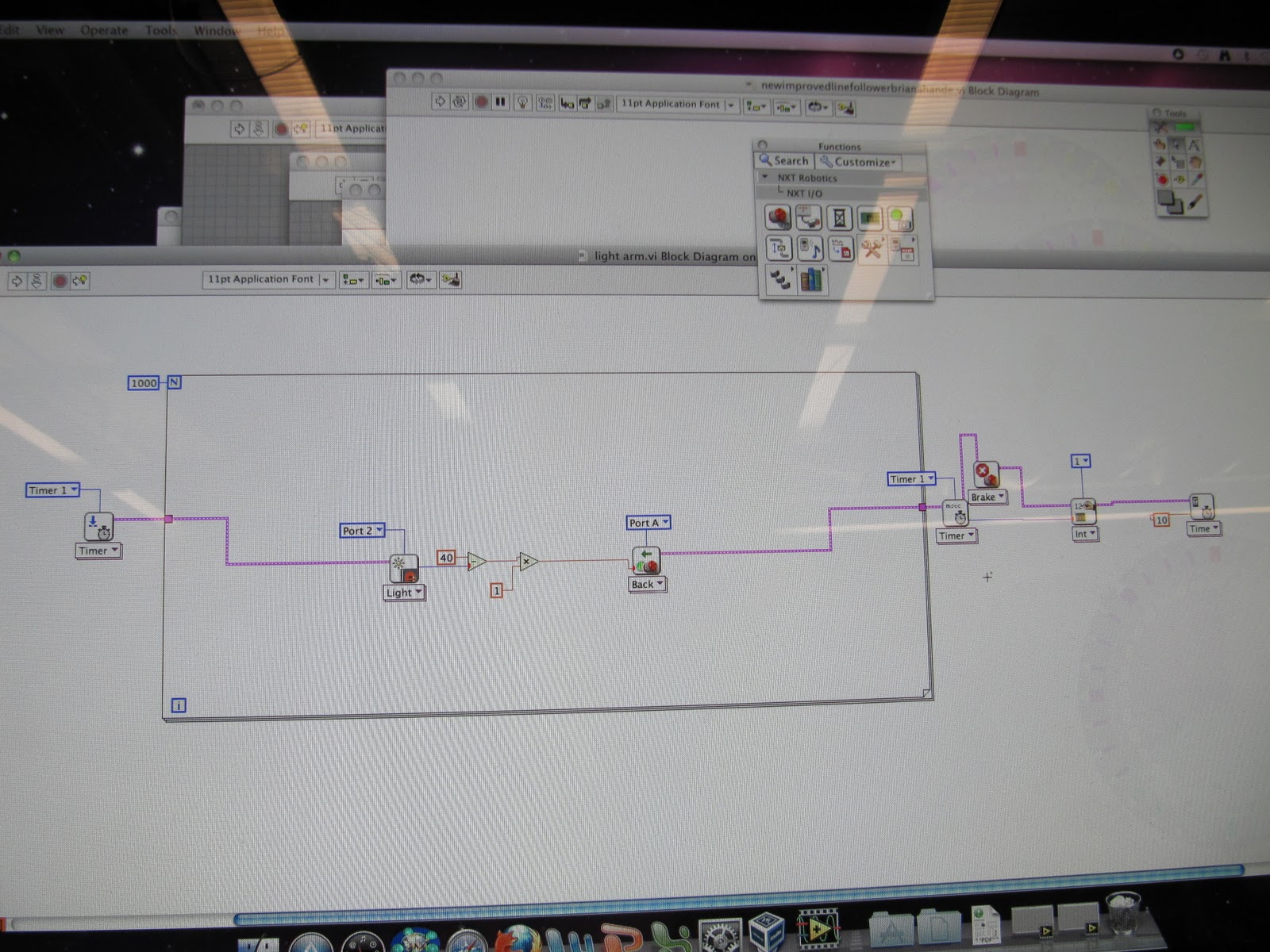
We put our newly-learned information into practice with two small projects.  The first was to use a proportional controller and full closed loop system to create a hovering light sensor beam that would always hover at a certain, set distance from a white piece of paper on the table.  The idea was that, no matter how one manipulated the hover arm (pushing it up or down, or even moving the paper up or down) the arm would adjust itself and return to its set distance above the paper. 

We decided that a light value of 40 would be our goal hover-height, and wrote this program:

Our closed-loop proportional controller! (At this stage, without a derivative)

Movie:


If we had added a derivative, this would have become our new equation: m = Kp(40-l) + KdΔE


m = motor speed
Kp = gain of proportional controller
Kd = gain of derivative
l = light sensor value
ΔE = change in error

We would have had two gains to experiment with, instead of just one—the gain of the proportional controller and the gain of the derivative.  We didn't have time to add a derivative control to the hover arm before moving on, but we made our first one in the next mini-project!


Mini-Project number two brought us back to our line following robots.  Our challenge was to revamp our vehicles so that instead of following a line, they would be able to follow a small light on the robot in front of them.  Ideally, each robot would speed up if it was too far away, slow down to maintain a constant speed when it reached optimal following distance, and back up if it found itself too close to the light sensor in front of it.


We did not need to make many changes to our light arm program, but we did finally add a derivative!  We also changed the optimal light value from 40 to 30, our robot's light reading at what we determined was an appropriate distance from the car in front of it.


Initial program . . .

And with added derivative!

We updated our line follower so that the light sensor would be able to sense light in front of it, instead of from the ground, and added a small light on the back so that other cars would be able to follow it.

Revamped robot!
Rear view!

We took our robot outside for a trial run, and found that it had trouble following the lights on other robots.  We went back to our program and switched the LED aspect of our light sensor off, and that seemed to solve the problem!  This was our equation: KpE + KdΔE.  We found that with the added derivative controller, we could make the gain higher and our robot would reach its goal more quickly, but without as many oscillations!


Here are two movies our our robot in action:

 Follow the leader success! (Our robot is in the back)

And again:

Our robot (in the center) misbehaves slightly at the end of this clip (it got overwhelmed), but it successfully moved forward in a line of three!  In the first clip, it accelerated when it was too far away, maintained a constant speed at the optimal distance, and backed up when it was too close . . . success!